Go back
  September 7 2026
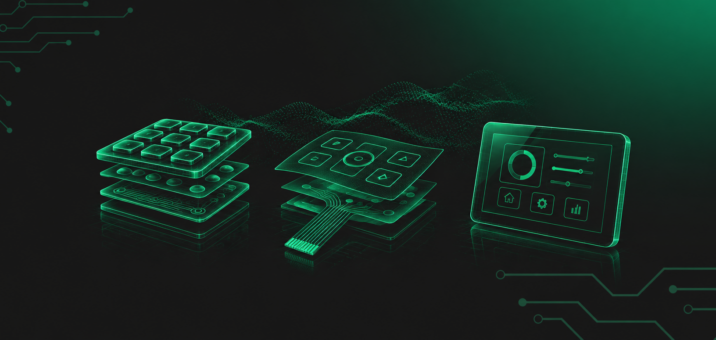
For years, the physical keyboard was an obvious element of a control panel. Raised keys, a perceptible actuation point, and the characteristic “click” gave operators a sense of control. And in many applications, they still do. However, there are situations where conventional buttons stop being an advantage and start limiting the design. This is where industrial touchpads come into play.
Not as a result of a trend toward touch interfaces, but as a response to specific technical requirements.
What sets an industrial touchpad apart from solutions known from consumer electronics?
An industrial touchpad has little in common with the delicate surface found on laptops. This is not about office convenience, but about reliable operation in environments where equipment is exposed to moisture, dust, chemicals, vibration, or frequent cleaning.
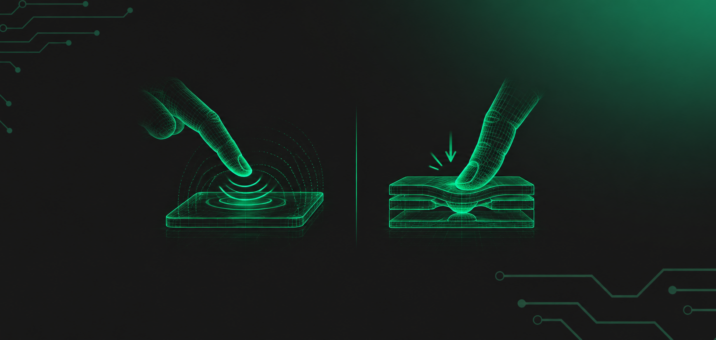
The technology can be resistive, responding to pressure, or capacitive, detecting changes in an electrical field. In practice, the choice should not be driven by trends, but by the operating environment. If a panel needs to operate with gloves, under changing humidity conditions, and in the presence of dirt or contamination, these factors must be taken into account from the very beginning of the design process. Otherwise, even the best touch system can become unpredictable.
An industrial touchpad is typically a continuous, sealed surface integrated into the front of the device. The absence of physical gaps means fewer potential failure points and makes the equipment easier to keep clean.
What makes a keyboard no longer the optimal solution?
An industrial keyboard is a robust and proven solution. The problem arises when the number of functions increases and the device needs to be more flexible than it was a few years ago.
A fixed key layout with printed symbols works well where functionality remains unchanged. However, if the software evolves, the device operates in different modes, or its configuration varies depending on the customer or market, a physical keyboard can no longer keep up. Every change requires a hardware modification.
A touchpad makes it possible to separate the functional layer from the physical layer. Combined with a display, it creates a dynamic interface that can be updated without modifying the physical design of the panel. This is particularly important in modern machines, where the software life cycle may be shorter than the life cycle of the device itself.
How do hygiene requirements affect the choice of interface?
There are industries where a smooth panel surface is not a matter of aesthetics, but a requirement. In the food, pharmaceutical, and medical industries, every gap is a potential place for contaminants to accumulate. Physical buttons, even when properly sealed, inevitably introduce divisions in the surface.
A touchpad integrated beneath a continuous front layer simplifies the construction. Fewer mechanical interfaces mean a lower risk of liquid ingress and easier disinfection. This is not merely a design detail – it is a factor that can affect the safety of the entire process.
Minimizing the front panel without sacrificing functionality
In compact devices, every centimetre of enclosure space matters. A keyboard requires specific spacing between keys, sufficient height, and a supporting structure for the button mechanism. A touchpad makes it possible to concentrate more functions within a smaller area and simplify the front panel.
This can be particularly beneficial in mobile devices, systems installed in specialized vehicles, or applications where the enclosure needs to remain as flat as possible. The absence of moving parts also translates into greater resistance to vibration – which is critical in some applications.
How should a touch interface be designed with the operator in mind?
The most common criticism of touch systems concerns ergonomics. An operator accustomed to the tactile feedback of a physical key may initially notice the lack of mechanical feedback. However, this is a matter of design rather than a limitation of the technology itself.
A well-designed industrial touchpad must provide clear feedback – visual, audible, and sometimes haptic. The interface logic should be intuitive, and active areas should be positioned appropriately. Directly transferring solutions from consumer electronics to industrial applications rarely works well. The margin for error is much smaller here.
From a design perspective, it is crucial to understand how the operator actually uses the device. Do they work while wearing gloves? Do they operate the panel without looking at it? Are lighting conditions variable? The answers to these questions determine whether touch technology will support the operator or make their work more difficult.
Limitations of touch technology in industrial applications
There are applications where a conventional keyboard remains the best choice. If an operator relies on muscle memory and needs to locate specific keys without looking, a physical key layout provides a clear advantage. In some applications, precise, localized actuation is simply more intuitive.
Touch technology also requires appropriate consideration of electromagnetic interference immunity and power supply stability. Without proper integration with the electronics of the entire system, even the best component will not perform its intended function.
How does Qwerty approach the choice between a keyboard and a touchpad?
Choosing between a keyboard and a touchpad is neither an aesthetic decision nor an attempt to “refresh” a design. It is a design decision that affects the durability of the device, operator comfort, and the stability of the entire system.
At Qwerty, the starting point is always the same: an analysis of the operating environment. What are the actual conditions? Will the panel be exposed to moisture, chemicals, or vibration? Will the operator be wearing gloves? Will the device functionality change over time? Only the answers to these questions make it possible to determine whether a physical keyboard or a touch surface is the better solution.
An HMI is not treated as a separate component simply “placed on the front of the enclosure.” It is an integral part of the system and must operate reliably for years, in a predictable manner, without causing downtime. An industrial touchpad can be the optimal solution when it results from the actual requirements of the application. A keyboard will be the better choice wherever blind operation and clear mechanical feedback are essential.
In practice, the question is not whether the panel has buttons or a smooth surface. The real question is whether it has been designed appropriately for the process it supports. That is precisely the difference between selecting a component and consciously engineering an interface.
This is the perspective we consistently apply at Qwerty: technology should be driven by analysis, not by trends.