Go back
  July 14 2026
In Greater Poland, in the west of the country, a steam locomotive depot has been running for decades that no longer exists anywhere else in the world. Locomotives from the 1940s and 1950s still pull regular passenger trains, on a regular timetable. The mechanism that makes this possible is simple and costly at the same time: valves, stuffing boxes, and connecting rods are made on-site in the workshops – in short, parts that no one manufactures anymore.
The decision to keep this competency in-house is more expensive in the short term than anything the market has to offer. It only pays off once it turns out that these parts simply don’t exist on the market. The same logic – on a completely different scale and in a completely different industry – applies to the contacts in retro computer keyboards.
The ZX Spectrum, which debuted on April 23, 1982, still works forty years later for exactly the same reason the Wolsztyn steam locomotives still run. Someone decided to keep producing parts for it that vanished from the market long ago.
The contact is a critical component of the device’s design
A contact is a mechanical electrical element that closes or opens a current circuit. The entire communication between user and machine is built on this single detail – from a single key to the Reset button and the “fire” button on a joystick.
In 1980s computers, the contact appeared in three contexts: under every key on a membrane keyboard, in every directional switch of a joystick, and under every action button. If it failed in any of these places, the device stopped working – losing the ability to accept input, for example, or to fire in a game.
A good contact has to be Normally Open by default, close the circuit when pressed, not bounce electrically, not oxidize over decades, withstand millions of mechanical cycles, and not drift in its characteristics over time. That sounds trivial only in a catalog.
Three schools of contacts in retro computers and consoles
In hardware from the 1980s and 1990s, contacts were built around three completely different design concepts. Each school had its own economics, production logic, and characteristic failure mode.
Foil and membrane contacts – the heart of the ZX Spectrum, Atari, and Amstrad keyboards
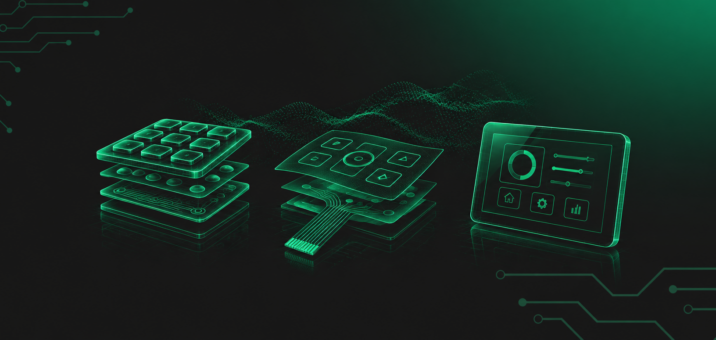
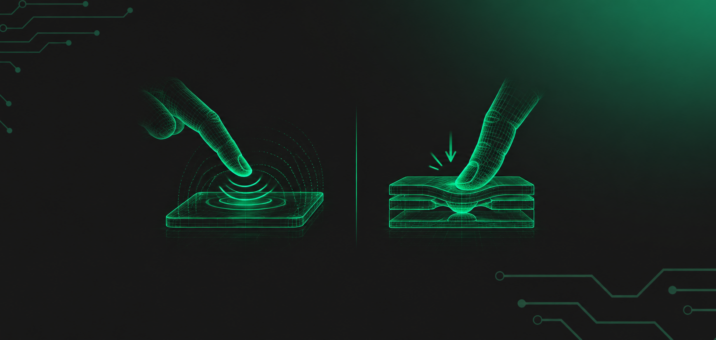
The keyboards of the ZX Spectrum, Sinclair QL, Atari 65XE and 130XE, and Amstrad CPC 664 are based on a simple matrix of foil contacts. Under every key sits a rubber dome with a conductive layer that, when pressed, bridges two traces on a polyester foil. The entire keyboard interface fits inside three layers of foil with a combined thickness of a fraction of a millimeter.
This type of contact was an economically brilliant solution. A single screen-printing matrix, a single sheet of polyester foil, and a single production cycle were enough to produce a complete home computer keyboard. The catch is that the traces on the foil age – they crack from repeated bending, oxidize from moisture, and the graphite layer beneath the domes wears away. After thirty or forty years, a typical ZX Spectrum only responds to about half its keys, meaning the space bar works but “Q” doesn’t.
Microswitches in joysticks – louder, but more durable
A classic joystick with microswitches sounds like a typewriter. Every movement and every press of the “fire” button produces a clear click, which comes from the fact that the contact has a snap-action mechanism that closes the contacts sharply at the moment of activation. The Cheetah Mach II and the Competition Pro from Dynamics both work on this standard.
Microswitches are louder but more durable and more precise than rubber contacts. Their cycle count usually exceeds a million, and their mechanical characteristics don’t drift over time. When a failure does occur, it’s usually caused by dirt on the metal leaves inside the microswitch – and it can be fixed by cleaning. The contact itself returns to its original characteristics.
Conductive rubber – a Polish contribution to joystick longevity
The rubber joystick contact was an answer to a real industry problem. By the late 1980s, standard contacts made of springy metal leaf lasted only a month or two in a heavily used joystick. Poland’s PTH MATT then applied an idea known from ELWRO calculators – a rubber contact with a graphite layer that bridges traces on a printed circuit board.
Durability increased many times over. The MATT STT joystick, designed for Amiga, Atari, and Commodore computers – including the Amiga 500, Atari 130XE, and Commodore 64 – worked on this standard. It has no autofire function, so firing is single-shot only, and it can be connected to a PC via the MATT interface as long as a GamePort is available. A rubber contact has a low unit cost and a lifespan measured in years. Its drawback turns out to be rubber dust, which accumulates on the contact surface after long use and requires cleaning out.
Normally-open contacts and the Reset contact – what gets decided in the circuit
Regardless of the mechanical design, every contact in a retro computer works in one of two modes. The most common is the normally-open contact (NO), open by default, which closes the circuit when a key, a joystick direction, or the “fire” button is pressed. This one contact accounts for the vast majority of input operations in 1980s computers.
The second mode is the Reset contact. It’s also normally-open and just as simple, but closing it doesn’t send a character to the screen – it forces a processor reset and restarts the entire computer. In 8-bit Atari machines, it existed from the factory as a dedicated RESET key on the keyboard itself. In the ZX Spectrum and Commodore 64, it was regularly added by modders – on the C64 most often by feeding a signal in from the user port or directly from the CPU’s reset line. From a design standpoint, it’s the same contact that works under the keys – just wired into a different point of the circuit. That means a failed Reset contact looks exactly the same as a failed spacebar – something simply stops responding.
Connector, port, and interface – what links the contact to the rest of the machine
A contact doesn’t work alone. Its signal has to reach the processor, and in the case of peripherals, it has to pass through a connector, plugs, pins, and a cable. Retro computers used two parallel solutions.
The first is the edge connector, in which the plug is the printed circuit board itself, with contact pads near its edge. This is how cartridge slots in consoles work, along with expansion sockets in 8-bit computers and PCI-type buses in later PC-class machines. The edge connector was cheap, sturdy, and – important in the era of mass production – allowed a new function module to be plugged into a single socket without extra connectors.
The second is the 9-pin D-Sub port, known as the “Atari port.” It became the de facto industry standard for joysticks on Atari, Commodore, and Amiga computers, as well as on the Sega console and devices like the Amiga CD32. A single D-Sub socket carries all the directions, the “fire” button, and power. The same nine pins could also handle paddles, driving controllers (also known as rotary controllers), and even – in some configurations – an output to a printer or modem. In practice, service technicians often encounter a splitter that allows two controllers to connect to a single D-Sub port – usually with switching between them, since the standard port can’t handle two signals in parallel.
In both of these standards, the contact is the first link in the chain, but every link after it – socket, plugs, pins, cable, sometimes a splitter – has to work just as reliably. A failure in any of them produces the same symptom: no response.
What gets decided after 30–40 years of service?
The ZX Spectrum, Amiga 500, Atari 130XE, Commodore 64 – all of these models now have forty years of use, storage, transport, and revival attempts behind them. The contacts inside them are no longer the original factory product, precisely because they’ve been working for forty years.
Three wear mechanisms are unavoidable in retro hardware. The first is mechanical wear – the springiness of rubber domes decreases, the metal leaves in microswitches lose contact pressure, and foils crack at the points of most frequent bending. The second is oxidation – silver and copper traces oxidize, graphite contact layers turn dull, and the contact loses its low-resistance character. The third is contamination – rubber dust, dust from the environment, a decade-old dried-up spilled drink, sometimes nicotine residue.
Each of these three mechanisms requires different treatment. Oxidation dissolves with isopropyl alcohol and Kontakt-brand cleaning products. Contamination can be cleaned off mechanically, with care. Mechanical wear, alone among the three, cannot be reversed. A cracked foil has to be recreated or replaced. In practice, this means a ZX Spectrum keyboard from 1983 is often no longer salvageable through chemical restoration and needs a new contact.
What connects the Wolsztyn steam locomotive depot with the ZX Spectrum?
On the surface, nothing. The locomotive depot burns coal by the ton per hour; the ZX Spectrum draws a few watts and fits in a backpack. Yet the mechanism behind their continued presence decades after launch is identical.
In both cases, the starting point was the same decision: don’t outsource the production of a critical part. In Wolsztyn, that means stuffing boxes, connecting rods, and valves. In the production of foil contacts for retro microcomputers, it means polyester foil with precisely printed traces, rubber domes with a conductive layer of specific resistance, and a copy of the original keyboard geometry from forty years ago.
In both cases, the decision is more expensive in the short term than buying on the market. Except there’s nothing to buy on the market. The ZX Spectrum was manufactured from 1982 to 1992 – by Sinclair Research until 1986, later by Amstrad, which bought the product line. The 8-bit Atari series disappeared from factories in 1992. The Amiga 500 – in 1991. Every one of these models is thirty years old or more, and every contact working inside one is either an original at the edge of its lifespan, or the result of someone deciding to produce it again in a new run.
Companies that kept this competency in-house are not hostages to other people’s decisions to discontinue production. That’s the whole advantage that in-house production gives you in a niche industry.
Three capabilities you won’t find in a catalog
The term “in-house production” is easy to blur in marketing. In practice, it means a few very concrete operational capabilities, and they’re what determines whether a retro computer can actually be brought back to life.
The first capability – reconstructing the geometry. Every hardware version has its own contact grid, its own spacing between traces, and its own dome layout. The ZX Spectrum differs from the ZX Spectrum+. The Atari 65XE differs from the 130XE. The Sinclair QL has yet another layout altogether. Without precise documentation or access to an original unit, reconstructing this isn’t possible.
The second capability – material control. The polyester foil on which the traces are printed has to resist bending, be insensitive to moisture, and be compatible with the conductive ink used. The rubber domes need exactly the tactile resistance the originals had – otherwise the keyboard feels different in the hand than users remember. This requires control over several parallel processes: screen printing, rubber molding, laminating.
The third capability – production continuity. The niche market for retro computer contacts sits, almost by definition, within a fairly stable base of modders, collectors, and retro repair services. The annual unit count is small but predictable. Maintaining production continuity at this scale requires a decision that the subject doesn’t get closed off, even if it doesn’t generate revenue at the level of the main product lines.
How this looks at Qwerty
At Qwerty, we began operating in 1988, at exactly the moment when standard metal-leaf contacts in joysticks lasted only a few months, and home computer keyboards broke down faster than they could be repaired. The first solutions to come out of our plant were an answer to that problem: contacts on polyester foil, replacing the original, failure-prone components.
Today, we keep foil contacts in production for the following microcomputers: ZX Spectrum, ZX Spectrum+, Sinclair QL, Atari 65XE, Atari 130XE, Atari 800XL, and Amstrad CPC 664. Each of these modules recreates the original solution while also serving as a more durable replacement – with polyester foil matched to modern resistance standards and geometry fitted to the original keyboard socket.
In a restoration project, we analyze:
- the computer model and the motherboard version the contact will work with,
- the type of keyboard (membrane, foil, hybrid) and the required dome pressure,
- resistance to the cleaning agents and solvents technicians use during repairs,
- compatibility with the housing design and with the contact layout on the PCB side,
- continuity of parts availability for the typical needs of modders and retro repair services.
For a typical ZX Spectrum owner, this means one thing. After the contact is replaced, the keyboard returns to the same feel it had four decades ago, and keeps working under conditions the original would never have survived.
Durability is not an advertising slogan
Durability is the consequence of decisions the market only notices once something fails elsewhere. In Wolsztyn, that decision was building and maintaining a workshop that produces, for itself, parts unavailable anywhere else. In Łódź, it’s maintaining production of foil contacts for microcomputers whose original manufacturers vanished from the market long ago.
Good contacts, like good stuffing boxes in a steam locomotive, work in the background and don’t draw attention to themselves as long as they do their job. That’s exactly why we prefer to design and produce them ourselves.